I Built a FIRE Countdown App Because No Tool Could Tell Me "How Many Days Left"
A 46-year-old salaryman in Japan with ¥50M ($330K) built his own FIRE countdown app: real index data, five FIRE types, days to freedom. Why and how.

Table of Contents
- “FIRE in X days.” That number greets me every morning
- It started as a boring asset tracker
- Running five FIRE types changed how close it felt
- Why I used four real indices instead of a lazy 5%
- The life-plan feature came from studying for FP2
- A sales guy built an app with Claude Code
- Checking it daily turned into a game
“FIRE in X days.” That number greets me every morning
Every morning I open my phone and see how many days are left until FIRE. It’s a FIRE countdown app.
Not my brokerage app. Not my budgeting app. One I built myself. A guy in IT sales, for the record.
The reason was simple. I wanted to know whether FIRE was something I could realistically reach, or something I’d never get to. Staring at my net worth told me nothing about the distance to the finish line.

It started as a boring asset tracker
Here’s the thing: I didn’t set out to build a FIRE calculator at all.
It started as a plain asset tracker. Record your money, watch it move over time. That part turned out solid — I’d happily show it to anyone. It calculates cleanly and doesn’t break when you poke at it.
But it had one problem. Watching your assets is boring.
A number that just sits there is a chore. There’s no sense of “where is this even going.” Probably the same reason budgeting apps die after three days on most people’s phones.
So I added something that gives you hope. That’s the FIRE countdown. Draw a single line — “X days to the goal” — across your asset data, and suddenly the same numbers mean something. Today’s contribution might have shaved a day off the finish. That alone makes it fun to look at.
That balance was the hardest part of the whole thing. A serious asset tracker versus a slightly fun FIRE counter. Lean too far either way and it feels wrong. Honestly, I still don’t know the right answer. That’s exactly where I most want to hear from people who use it.
To make the “tracking alone isn’t enough” point concrete: before this, I used MoneyForward — Japan’s version of Mint or Monarch — and just stared at my net worth.
“Once my assets hit ¥X, maybe I can FIRE.” That was the whole picture. A vague feeling, never a real number.
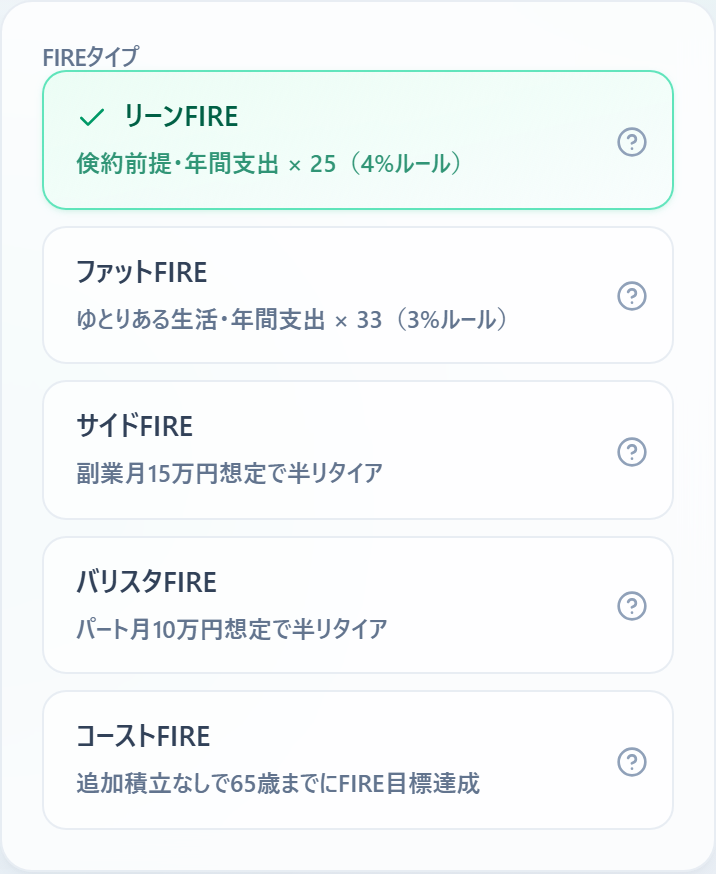
The annoying part is that FIRE comes in flavors. Lean FIRE on a tight budget, Fat FIRE with breathing room, Side FIRE assuming some freelance income, Barista FIRE assuming part-time work, Coast FIRE where you stop contributing and let it ride to 65. Each one has a completely different target. And all I had was one number: total assets.
Running that math five times on a calculator is genuinely tiring. And assets move daily — calculate once, and tomorrow it’s stale.
Running five FIRE types changed how close it felt
Plugging in my own numbers and watching it calculate was more fun than I expected.
| FIRE type | When I’d reach it |
|---|---|
| Side FIRE | Already there |
| Barista FIRE | 2 years out |
| Fat FIRE | 9 years out |
Same assets, same spending — yet the answer ranges from “you’re already done” to “nine more years,” just based on which FIRE you pick.
When Side FIRE came up as “achieved,” I did a double take. If you assume roughly ¥150K (~$1,000) a month in freelance income, the math says my assets are already enough. I sort of knew that in the back of my head, but seeing “achieved” on a screen hits differently.
Fat FIRE, on the other hand: nine years. Full retirement with a comfortable budget is still a long road.
Seeing “2 years” and “9 years” side by side on one screen was the single biggest payoff for me. If you want the deeper math on Side FIRE, I broke it down in my Side FIRE plan as a 40-something with ¥50M.
Why I used four real indices instead of a lazy 5%
The thing that always bugged me about FIRE math is the assumed return.
Most online calculators run a fixed number like “5% a year.” But S&P 500 and FANG+ have wildly different histories. If I’m not calculating with the funds I actually own, I can’t bring myself to trust the date it spits out.
So I dropped the fixed number. S&P 500, All-Country (ACWI), NASDAQ 100, FANG+ — the app pulls live data for these four every day and uses a weighted average based on my holdings. Index drops, the date slips. Index climbs, it gets closer. A living number.
There’s a reason I narrowed it to these four. One, the price data is reliable to fetch. Two, they’re the funds I actually buy. I wrote about why this exact lineup in why I narrowed it down to three funds.
Individual stocks got cut, deliberately. The data is hard to pull, and the long-term return basis is shaky. Try to include everything and the whole app goes blurry. For an index guy like me, four was plenty.

The life-plan feature came from studying for FP2
Separate from the countdown, the app also builds a full life plan. Profile, income, living costs, education, pension, old age, inheritance — 16 tabs. At the end it scores you out of 100.
Why go that deep? It traces back to when I earned FP2, Japan’s financial planning certification (roughly a U.S. CFP).
Studying for it, you learn the whole life-planning framework. But when I tried to run it on my own household numbers, there was nothing decent to actually record and calculate it with. I kept starting in spreadsheets and giving up. Yes — me, the self-proclaimed spreadsheet guy. My wife was not impressed.
So I built the thing I wanted to use. Enter your age, income, and spending, and your lifetime cash flow and asset balance become a single graph. If the FIRE countdown is short-term hope, this is the map of your whole life.

The report scores what you entered out of 100 and even flags what to improve. Getting your household graded is a little scary and a little addictive. I ran our real numbers, got a perfect score, and immediately thought “…really?”

A sales guy built an app with Claude Code
By now you’re wondering how a sales guy built an app.
The answer: I leaned on AI, hard. I told an AI called Claude Code what screens I wanted, and we shaped them together.
This part was genuinely fun. Say “take total assets, work backward to a finish date, show it as a graph,” and it turns into a working app. The rough picture in my head becomes a screen I can touch every day. Closest thing I can compare it to: describing a blueprint out loud and watching a house go up. AI is wild, honestly.
I forget exactly how long it took, but it was far shorter than I expected to get a first working version. A non-engineer pulling this off is entirely thanks to the AI.
For example, the graph below. How your assets grow from here and when you hit the target. I said “color-code the initial investment and contributions, draw a line to the target age,” and this is what came out. Way more future than a calculator ever shows.

Checking it daily turned into a game
The original goal was “look at it daily for motivation.” That part mostly worked.
Lately the S&P 500 keeps swinging up and down, so I can’t help but check. On up days the finish line creeps closer and I smirk. On down days it slides back and there’s a dull weight in my gut. A few days of drift. Still.
But then the game gets interrupted by reality. Side FIRE says “achieved,” and yet I haven’t moved an inch. On paper I’ve crossed the line — but the moment I imagine actually quitting my job, the courage just isn’t there. The app I built to boost my motivation basically tells me, “you still can’t pull the trigger, can you.” People who actually execute FIRE are impressive. My own tool taught me that all over again.
I put the messier, up-and-down emotional side of this on my Note. The blog gets the mechanics, Note gets the honest stuff.
For now, the app is Android only. It’s published under the name “Mirainote.”
→ Mirainote - Life Plan × FIRE Simulator (Google Play)
If enough iPhone users want it, I’ll build that version too. If you’d rather see your distance to FIRE in concrete days than a vague feeling, it might click for you. At minimum, it added one thing to my morning routine.
This applies beyond Japan: a number that just sits there won’t move you. A number counting down to your freedom might.
If you try it, tell me which FIRE type came out closest — on X or Note. I’m genuinely curious what other people’s “days left” looks like.
Investing is your own responsibility. This is a personal account, not investment advice, and the app’s projections don’t guarantee any future result.
Related Articles

When People Start Saying 'Index Funds Aren't Enough,' AI Stocks Are Probably Overheated
My friend made $20K on Micron. Social feeds compare index funds to AI funds over four-week windows. Here's why I'm not changing anything.

I Sold 3 Japanese Stocks 15 Years Ago. They'd Now Be Worth $200K More — Here's What I Got Wrong
A 46-year-old Tokyo salaryman walks through three stock sales from 2011 that turned into a $200K opportunity cost — and what finally fixed the pattern.

I Failed Japan's FP2 Cert Once, Then Passed — And It 'Answer-Keyed' My 8 Years of Investing (Series Part 3)
I failed the FP2 written exam once, then passed. The bigger finding: every money call I'd made in 8 years was printed in the textbook as the right answer.